The whole design, in writing
Learn AI system design by building a document AI / intelligent document processing pipeline that turns PDFs, scans and forms into structured data step by step. An interactive guide covering why plain OCR is not enough, preprocessing and OCR, layout understanding, template vs ML/VLM extraction, validation and confidence, human-in-the-loop review, and the unhappy paths (bad scans, varied layouts, hallucinated fields, PII).
Every step of the build above, written out: the problem each piece solves, the option that was taken and the ones that were not, the numbers, and how it fails in production.
The big idea
What is document AI?
Businesses drown in documents — invoices, forms, contracts, receipts, IDs — that humans manually key into systems. You want to turn a messy scanned invoice into clean structured data: {vendor, invoice_no, total, line_items[]}, automatically, at scale. But documents are visual, varied, and full of layout (tables, forms, columns) that a plain text dump throws away.
A document AI (intelligent document processing) pipeline turns unstructured documents into structured data: preprocess and OCR the image, understand its 2D layout, extract fields and tables (increasingly with a VLM reading the doc directly), validate with confidence scores, and route the doubtful cases to a human. Reading the pixels is easy; producing correct structured fields is the system.
What the new pieces do
- Documentsclient
- Invoices, forms, contracts, receipts — messy, varied, often scanned. The goal: turn them into clean structured data.
Step 1 · OCR alone isn't enough
Text is not structure
The naive approach: run OCR and return the text. OCR is great at reading characters. So why isn't "the text of the document" the same as the structured data you need?
Run OCR and return the text. Why isn't that the structured data you need?
OCR reads characters but flattens the 2D page into linear text, discarding the spatial relationships that carry meaning: which text is a key vs a value, which numbers belong to which table row/column, what's a header. Structured data needs that layout understanding, not just the raw text.
OCR reads printed text well — that's its job. The gap is structure: turning correctly-read characters into fields and tables requires understanding the page's 2D layout, which raw OCR text doesn't preserve.
Length isn't the issue. The issue is that a linear text dump loses the spatial/layout structure (key-value pairs, tables, columns) that defines what the data actually means.
OCR reads the characters, but flattens the page into a linear text stream, discarding the 2D structure that carries the meaning: which text is a label vs a value, which numbers belong to which table cell, what's a header. Structured data — fields and tables — lives in that spatial layout. So "the text" isn't "the data"; you need to understand the layout and extract structure, not just recognize characters.
Why this piece earns its place
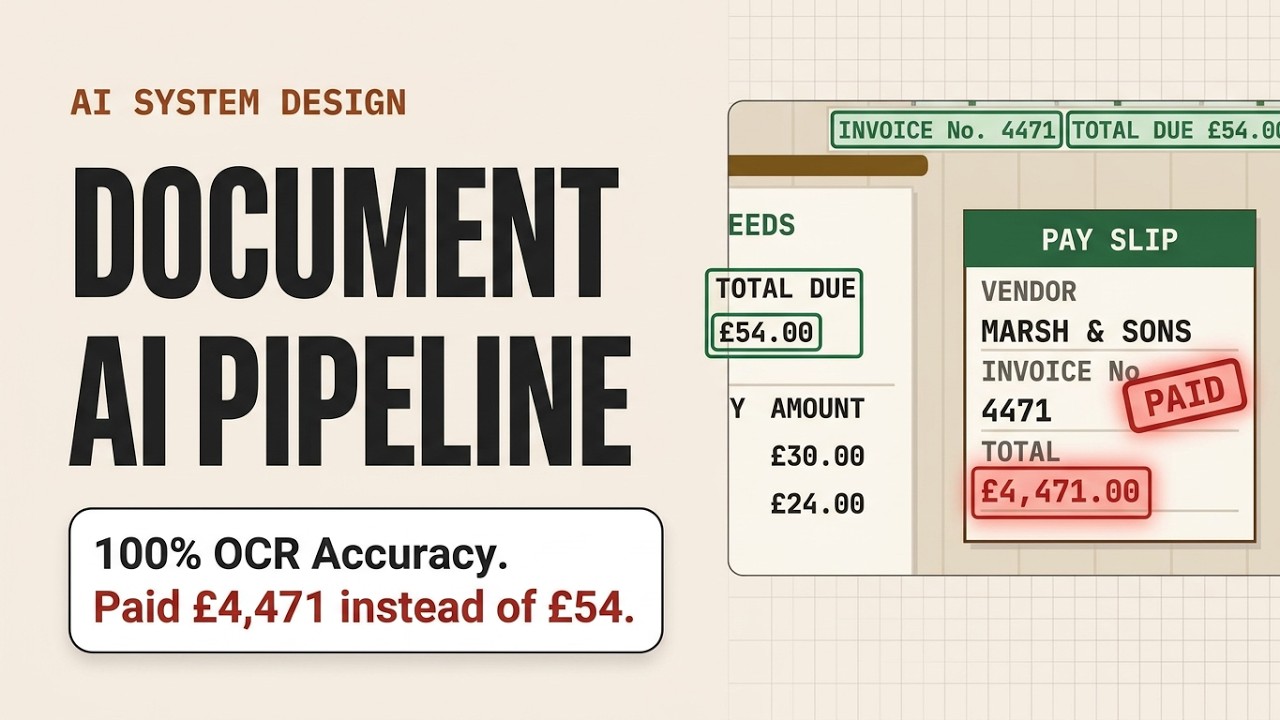
The metric trap here is worth naming out loud, because it is how a pipeline ships broken. OCR engines are graded on character accuracy, and character accuracy compounds: a field is wrong if any single character in it is wrong, so a per-character error rate that reads as excellent becomes a field-level error rate that is far worse, and worst of all on the longest fields — the account numbers and reference IDs a downstream system keys a payment to. Measure accuracy per field, by field type, or you are grading the wrong exam. The same trap catches the test harness: if the acceptance check is whether the text dump contains the string 4471 somewhere, a pipeline that lost every label-to-value link still passes it. There is one case where the text really is the deliverable — full-text search over an archive, where a human reads the hit and supplies the structure themselves. If that is the actual requirement, stop at this step; everything after it is cost you do not need.
Step 2 · A pipeline, not a step
Ingest → understand → extract → validate
Turning a document into trustworthy structured data is several distinct jobs. What are the stages, and what does each contribute?
Run a pipeline: ingest the document → preprocess + OCR (clean the image, read text + coordinates) → layout analysis (understand the 2D structure) → extraction (produce fields and tables) → validation (check + score confidence) → structured output, with low-confidence cases routed to a human. Each stage removes a different failure: OCR handles pixels, layout handles structure, extraction handles meaning, validation handles correctness.
Why this piece earns its place
Drawing the stages is the easy half. The operational half is that each stage persists its own output, versioned. OCR is the expensive one and its result is reusable, so it gets cached — but the key has to be the source file hash and the engine version, because OCR is deterministic per engine, not absolutely. Key on the file alone and the day you move to a handwriting-capable reader, every document you have already touched keeps serving the old engine's text forever, and no cache miss ever tells you. Extraction is the opposite: the schema gains a field, the prompt changes, a better model ships, so it is re-run over history constantly. Fuse the two into one function and every schema tweak repays the whole OCR bill, turning a backfill that should be an afternoon into a budget conversation. Versioning earns its keep the day you find a systematic error. Someone reports a wrong total, you trace it to a recent extractor release, and the only question that matters is which documents it touched. If every record carries the OCR version, the model version and the schema version that produced it, that is a query. If it does not, it is a full reprocess and a diff, on the hope you can still tell the new errors from the old ones.
- ingest → OCRpixels → text+coords
- layout → extractstructure → fields
- validate → outputcorrectness → data
What the new pieces do
- Doc AI Servicegateway
- Orchestrates the pipeline: preprocess, OCR, understand layout, extract fields/tables, validate, and output structured data.
Step 3 · Read the pixels
Preprocessing & OCR
Real documents are photographed, skewed, low-contrast, or noisy scans. Before understanding anything, you must reliably get the text off the page. What does this stage do?
Preprocess the image — deskew, denoise, adjust contrast, handle rotation and multi-page — then run OCR to extract not just the text but the bounding-box coordinates of every word/line. Those coordinates are crucial: they're what the next stages use to reconstruct layout. Good preprocessing lifts OCR accuracy (garbage pixels → garbage text), and keeping word positions is what lets "reading" become "understanding."
Why this piece earns its place
Preprocessing destroys data silently, which is why the original upload is sacred. Aggressive binarisation or denoising erases thin strokes — a decimal point, a comma, a hyphen inside an ID — and the damage never surfaces as a failed read, because what comes back still parses. A total that lost its decimal point is a perfectly valid number, and nothing downstream questions its shape. So keep the upload untouched forever, treat the cleaned image as a derived artifact you can regenerate, and tune the filters against the scans that fail rather than the ones that already work. Then ask whether this document needs OCR at all. A born-digital PDF carries a text layer with exact character positions, and rendering it to pixels to read them back is a lossy round trip over data that was already perfect. But a text layer is not proof of a native one: a scan that somebody else ran through OCR and saved as searchable carries one too, at unknown quality, and a subset font with no ToUnicode map extracts as mojibake. Branch on evidence — the producer string, whether the glyphs sit invisibly over a full-page image, whether what you pull out is even decodable — not on presence.
- preprocessdeskew/denoise
- OCRtext + bounding boxes
- positionsenable layout
What the new pieces do
- Preprocess + OCRservice
- Cleans the image (deskew/denoise) and runs OCR to get text plus the coordinates of every word on the page.
Step 4 · Understand the page
Layout analysis
Now the pivotal step. You have located text, but a form, a table, and a paragraph all need to be read differently. How do you recover the document's 2D structure?
You have text with coordinates. How do you recover the document's structure (forms, tables)?
Reading-order flattening is exactly what loses structure — it mixes table cells and separates labels from values. You need to model the 2D layout: detect regions, tables, and key-value relationships from positions.
Without layout, extraction has to guess structure from a jumbled stream, which fails on tables and multi-column forms. Explicit layout understanding gives extraction the spatial structure it needs.
Layout analysis models the page in 2D: it detects blocks/regions, table cells (rows/columns), and the spatial links between field labels and their values. Layout-aware models (e.g. LayoutLM-style, combining text + position + image) or a VLM that sees the page directly recover the structure that linear text loses.
Layout analysis models the page in 2D: detect regions (header, blocks), tables (rows/columns/cells), and key-value relationships (which label owns which value) from the spatial arrangement. Use layout-aware models (LayoutLM-style: text + position + image together) or a VLM that sees the page image directly. This is the crux — it recovers exactly the structure OCR flattened, turning located text into an understood document.
Why this piece earns its place
Whatever produces the structure, insist it comes back as coordinates on a page and not just a tidy object. A wrong total looks identical either way: layout may have merged two columns, or the extractor may have misread a clean cell. Those have opposite fixes and usually different owners, and the output alone cannot separate them — the boxes can. The catch is that a box is only meaningful against the image it was measured on, and preprocessing has already deskewed, rotated and rescaled that image. Record the transform beside the coordinates, or store them in the original page's space, because the cleaned copy is a derived artifact: the day a reviewer opens the source PDF, a highlight computed in the wrong space lands near the value rather than on it, and nobody can tell whether the extractor or the viewer is the liar. Worth settling early too is that this stage runs per page and it is the expensive one. A real corpus is full of pages it has nothing to find on — separator sheets, fax covers, the back page of standing terms — so a cheap classifier deciding which pages get layout analysis at all moves the bill further than any tuning inside the model.
- regionsheader/blocks
- tablesrows × columns
- key-valuelabel ↔ value
What the new pieces do
- Layoutlayout
- Understands the page as 2D structure — forms, tables, columns, key/value pairs — not a linear stream of text.
Step 5 · Pull the fields
Extraction: templates vs ML vs VLM
Now produce the actual structured output — the fields and tables you want. Documents range from fixed forms to wildly varied invoices. What extraction approach fits?
Match the method to the variety. Templates/rules work for fixed layouts (a form that's always identical — extract by position/regex). ML models (layout-aware) handle varied documents by learning to tag fields. Increasingly, a VLM/LLM reads the document (image and/or OCR text) and outputs structured JSON directly to a schema — flexible across document types with little per-template work. Often you classify the document type first, then route to the right extractor.
Why this piece earns its place
The router is the failure the diagram cannot show. A classifier that misroutes is worse than one that abstains, because handing an invoice to a purchase-order extractor does not error — it returns a confident, fully-populated record built on the wrong assumptions. So the classifier needs its own confidence and its own fallback: below the bar, send the document to the general extractor rather than to the nearest specific one, and log the near miss so a new vendor format announces itself instead of quietly degrading. The subtler trap is that in a schema-prompted pipeline the schema is the prompt. Field names and their descriptions are the instruction the VLM reads, so renaming amount_due to read better for the engineers downstream, or sharpening a description to help them, is a model change wearing a data-contract costume — extraction moves on documents nobody touched. Treat a schema edit like a prompt edit and run it against a held-out set before it ships. And give absence a representation of its own, so a field the extractor looked for and could not find reads differently from one it was never asked to look for; a bare null says both, and only one of them is the document's fault.
- templatefixed forms
- ML/VLMvaried docs → schema
- classify + routeper doc type
What the new pieces do
- Extractionservice
- Turns text + layout into structured fields and tables — via templates, an ML model, or a VLM reading the doc directly.
Step 6 · Is it right?
Validation & confidence
Extraction gives you values — but some are misread, ambiguous, or (with an LLM extractor) hallucinated. When this data feeds payments or records, a confidently-wrong field is dangerous. How do you know which values to trust?
Extracted fields may be misread or hallucinated. How do you know which to trust?
Check each field against its expected type/format (dates, currency, IDs), cross-check with business rules (line items sum to the total, invoice number matches a pattern), and attach a confidence score. Fields that fail checks or score low are flagged rather than trusted — catching misreads and hallucinated values before they reach downstream systems.
Even accurate models misread bad scans and can hallucinate field values, and downstream use (payments/records) makes a wrong value costly. You must validate and score confidence, not blindly trust.
Re-running can help but doesn't catch systematic errors and doubles cost. The robust approach is schema/rule validation plus confidence scoring (and human review for low confidence).
Validate every extracted value: check type/format (a date is a date, currency parses, an ID matches its pattern), apply business rules (line items sum to the total, required fields present), and cross-check across the document. Attach a confidence score to each field. Values that fail a check or score low are flagged, not trusted — this is what catches OCR misreads and, critically, LLM-hallucinated values before they reach payments, records, or contracts.
Why this piece earns its place
The word confidence hides the hardest question on this page: where does the number come from? An OCR engine reports a per-character probability. A tagging model reports a span probability. A VLM emitting JSON reports token logprobs, which are a weak flag at best — they describe how sure the model was of its next token, not whether the value is on the page, and they are uncalibrated, sitting high on invented ones. So in a VLM pipeline the score is something you manufacture: rule outcomes; how the field has behaved on documents from this source before, where a vendor's reference matched one pattern for years and abruptly does not; and disagreement between two unlike extractors. That last one is the re-run option this step's prediction rejects, with half the objection answered — unlike extractors disagree where a repeated one agrees with itself, so it does see systematic error — but the doubled cost stands, so it belongs on a sampled slice or on the handful of fields that move money. Whichever you build, calibrate it against what reviewers actually found, or the threshold downstream is a number with no units. And note that format checks indict a field while cross-field rules indict a record: line items failing to sum names no culprit, and a queue that can only flag fields will pick one arbitrarily and send the reviewer to the wrong place.
- schematype/format checks
- rulestotals/patterns cross-check
- confidenceper field
What the new pieces do
- Validationservice
- Checks extracted values against schema/format/business rules, assigns confidence, and flags anything doubtful.
- Structured Outdata
- The result: clean structured data (fields, tables) ready to feed databases, payments, or downstream systems.
Step 7 · Humans on the hard cases
Human-in-the-loop
Some documents are genuinely hard — awful scans, handwriting, unusual layouts — and full automation would either error out or produce wrong data. You can't accept mistakes on critical records, but you also can't review everything by hand. How do you balance automation and accuracy?
Use confidence-based human-in-the-loop: auto-accept high-confidence extractions, and route low-confidence ones (or specific critical fields) to a human reviewer who corrects them. This keeps automation high while guaranteeing accuracy where it matters. Crucially, close the feedback loop: human corrections become labeled data that improves the models, so the share needing review shrinks over time. You automate the easy majority and spend human attention only where confidence is low.
Why this piece earns its place
The threshold has a blind spot built into its shape: everything above it is unmeasured by construction. Reviewers only ever generate ground truth for documents that fell below the bar, so the errors you can count are the ones you already caught, while the auto-accepted stream — the part that actually reaches payments — produces no signal at all. Its error rate looks like zero because nothing is looking at it. Sample it: route a small random slice of high-confidence extractions through review anyway, marked as an audit, and you get the false-accept rate the threshold is supposed to be buying you. The flywheel deserves the same skepticism. Corrections are a biased label set by definition, describing only the hard tail, so training on corrections alone drags the model toward the difficult cases and can quietly cost accuracy on the easy majority you never watch. Mix them with sampled ordinary documents, and keep a frozen evaluation set the review queue never feeds.
- high confauto-accept
- low confhuman review
- corrections→ retrain models
What the new pieces do
- Human Reviewclient
- A review queue for low-confidence extractions; human corrections become labels that improve the models.
Step 8 · The sharp edges
Scans, tables, hallucination & PII
Real document processing hits hard corners: terrible scans and handwriting, endlessly varied layouts, tables spanning pages, LLM hallucination of field values, and sensitive PII/compliance.
Improve bad inputs with preprocessing and robust/handwriting-capable models, and lean on human review when quality is too low. Handle varied layouts with document classification + routing and layout-general models rather than one brittle template. Manage multi-page tables by stitching rows across pages. Guard against hallucination: constrain extractors to ground each field in the document (return the source location/box), and validate — never let a VLM invent a value with no evidence. Treat documents as sensitive: PII redaction, access control, retention, and audit trails for compliance. And run it as an async batch pipeline that scales across document types.
Why this piece earns its place
The compliance problem that sinks these projects is not redaction, it is copies. By the time one document reaches structured output it exists as the original upload, a cleaned image, an OCR text blob, a layout artifact, a cached render in the review queue, and — if the extractor is a hosted model — a request body on somebody else's infrastructure. Each of those is the document. A deletion request has to reach all of them, and the one teams forget is the debugging trail: the stored prompts and responses that make a bad extraction diagnosable are full-text copies of the most sensitive pages you hold. Decide that log's retention window while you are building it, not when legal asks. Which jurisdiction the hosted extractor runs in, and whether its provider retains inputs, are contract questions before they are architecture ones. And note the ordering constraint: you cannot redact what you have not located, so redaction runs after reading, off the same boxes, and the unredacted stage still happened.
You did it
You just designed a document AI pipeline.
Everything you assembled, in order
- Plain OCR gives characters but flattens the 2D layout — text is not structured data.
- Run a pipeline: ingest → preprocess/OCR → layout → extraction → validation → structured output.
- Preprocess then OCR to get located text (words + bounding-box coordinates).
- Layout analysis recovers 2D structure (tables, key-value pairs) — the crux, via LayoutLM-style models or a VLM.
- Extract with templates (fixed forms), ML, or a VLM outputting schema JSON; classify + route by doc type.
- Validate against schema/rules and score confidence to catch misreads and hallucinated fields.
- Route low-confidence cases to human review; corrections retrain the models and raise the automation rate.