The whole design, in writing
Learn AI system design by designing a skill system for an AI assistant like Claude. An interactive guide covering why a hundred skills cannot all be carried in a 200,000-token context window, the folder (instructions file, extra files, scripts), the always-loaded label, a matcher where the description is the trigger, progressive loading in three levels, on-demand reference files, scripts that are run and never read, and the trust gate for skills someone else wrote.
Every step of the build above, written out: the problem each piece solves, the option that was taken and the ones that were not, the numbers, and how it fails in production.
The big idea
"Design a skill system" — why is this even hard?
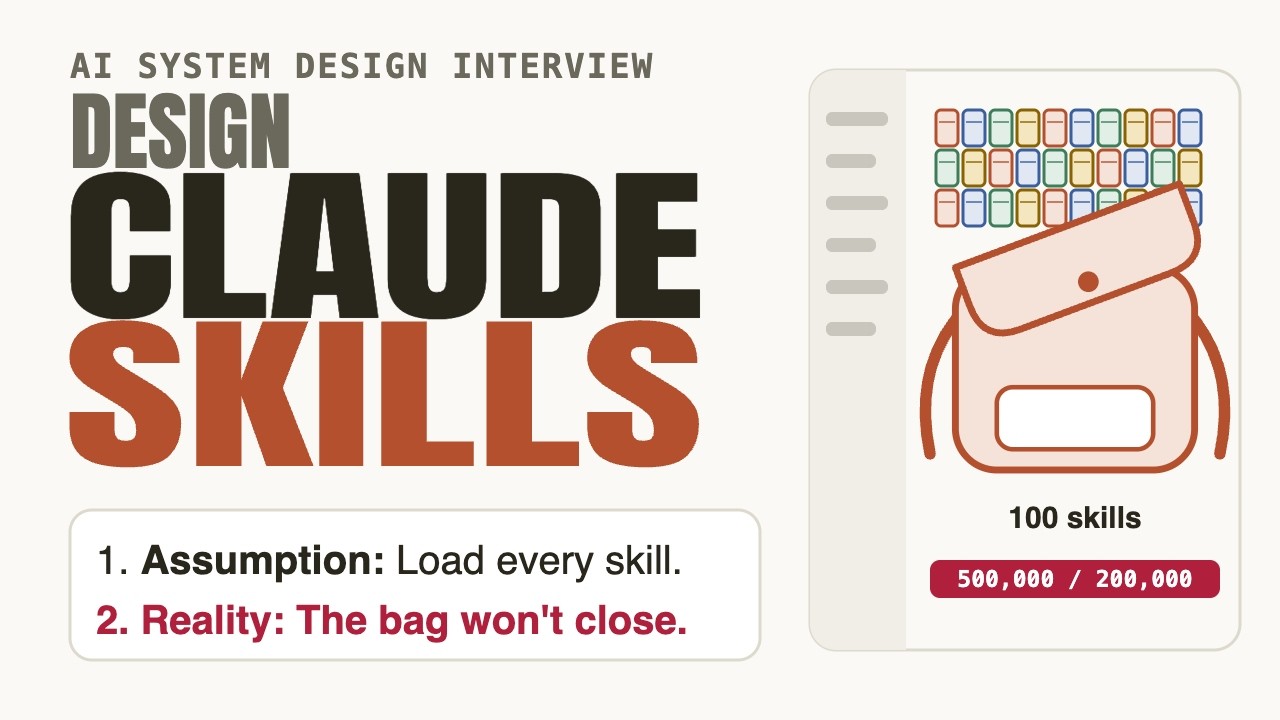
An assistant should be able to do specialised things — format a report, fill a PDF, follow your team’s review checklist. Each of those needs pages of instructions. Give it a hundred skills at about 5,000 tokens each and that is 500,000 tokens of instructions, against a context window of, say, 200,000. Two and a half bags. The window is the one scarce thing, and it is also where the thinking happens.
Do not carry the books — carry the labels. Put each skill on a shelf, keep only a name and a description in the window, open the instructions when the task needs them, open a reference file only when a step needs it, and run a script instead of reading it. Then treat the whole shelf as software someone wrote, because it is.
What the new pieces do
- Userclient
- The person asking. Their request is the only thing that decides which skill, if any, should be opened.
- Claudemodel
- The model and its context window — the one scarce thing. Everything a skill system does is about deciding what is allowed into this window, and when.
Step 1 · The folder
A skill is a folder, not a paragraph
A skill has to bundle three different kinds of thing: the instructions, the reference material those instructions point to, and small programs for work a program does better than a model. How do you package them so Claude can reach any of it without carrying all of it?
How should a skill be packaged?
That is the everything-in-the-prompt build: a hundred of them is two and a half windows, and the bag is full before hello.
Separate files mean separate costs. Instructions, manuals and code can each be reached on their own, so only what a task needs ever moves into the window.
It adds a retrieval system to build and tune, and it still has no way to separate the instructions from the manual from the program.
A Skill Folder holds one SKILL.md (a name and description on top, instructions below), optional reference files and optional scripts. It sits on a shelf. Nothing in it is in the window yet.
Why this piece earns its place
The folder is the unit of reach, so its shape decides what can ever be made cheap. Splitting instructions from references from scripts is what lets the later steps exist at all: a skill that is one blob can only be loaded whole or not at all. Names are constrained for the same reason — a short, lowercase, hyphenated identifier is something a matcher and a human can both scan across a hundred entries without ambiguity. The part that gets underestimated is authorship: a folder is written once by someone who knows the task and read many times by a model that does not, so the instructions file has to be self-sufficient, and anything that would bloat it belongs one file over. A folder you cannot split is a folder you will end up loading whole.
- 1instructions file
- 0+reference files
- 0+scripts
What the new pieces do
- Skill Folderstore
- A skill is a folder: one instructions file (SKILL.md), optional reference files, optional scripts. It lives on a shelf, not in the prompt.
Step 2 · The label
What is always carried
Claude cannot choose a skill it has never heard of, so something about every skill must be in the window all the time. How little can that something be and still let it choose?
What should be loaded for every skill, every conversation?
A hundred skills × 5,000 tokens is 500,000 — more than the window. The standing cost has to be a rounding error.
A tag cannot say what the skill does or when to use it, so the model has nothing to match against and picks badly.
About 100 tokens each: a hundred skills is ~10,000 tokens, 5% of the window, and it is enough for Claude to know every skill exists.
The Label Index: every skill’s name and description, about 100 tokens apiece, always loaded. 100 × 100 = 10,000 tokens — 5% of a 200,000 window. The folders stay on the shelf.
Why this piece earns its place
The label is the only part of a skill that is paid for every turn, so every word in a description is a recurring cost. That is the argument for brevity and also for precision: a description has to carry two things in a few sentences — what the skill does and when it applies — and it has to do it distinctly enough that it cannot be confused with its neighbours. Treat it like an API contract rather than a blurb. It is also the number that does not stay flat: labels cost nothing per skill on the day you have ten and half the window on the day you have a thousand, so a skill shelf needs a retirement policy the way a cache needs an eviction policy. The standing cost is small, but it is the one that scales with your ambition.
- ~100tokens per label
- 10,000for 100 skills
- 5%of the window
What the new pieces do
- Label Indexalways
- Each skill’s name and description, about 100 tokens apiece. The only part of a skill that is always carried — 100 skills cost ~10,000 tokens.
Step 3 · The matcher
The description is the trigger
A request arrives: “turn this spreadsheet into a report.” A hundred labels are in the window. Something has to decide which skill, if any, applies — and that decision gets made with no access to the instructions.
How does Claude decide which skill to use?
The model is already a language matcher. The description is the trigger, so its wording decides whether the skill is ever chosen.
A keyword table is brittle, needs maintenance per skill and misses paraphrases the model would catch for free.
That loads every skill — the exact cost the label was designed to avoid — and burns turns on failures.
The Matcher is Claude itself: it lays the request beside the labels and chooses. No new service. That makes the description the trigger — written as what it does + when to use it, in the third person. A vague description is never picked, and nothing reports the miss.
Why this piece earns its place
Because the matcher has no instructions to consult, a miss is silent in a way most failures in a system are not. There is no exception, no log line, no timeout — the skill simply never fires and the assistant answers from general knowledge, often plausibly. That makes description quality a testable property you have to test on purpose: write a set of requests that should trigger the skill and a set that should not, run them, and treat a missed trigger as a defect in the description. The two failure directions matter separately. Too broad, and the skill steals requests it does not handle well; too narrow, and it never fires on the phrasing real users use. Tune with real requests, not with the wording you imagined.
- 1,024chars max description
- what + whenthe two halves
- silentfailure when vague
What the new pieces do
- Matcherservice
- Claude itself, reading the request beside every description and choosing one. There is no search engine: the description is the trigger.
Step 4 · The loader
Open the book only when it matches
A label matched. Now Claude needs the actual instructions — but only that skill’s, only now, and not a byte of any other. How do they get into the window?
When should a skill’s instructions enter the window?
That is the step-2 mistake again. Instructions you may never use are the most expensive tokens in the window.
Progressive disclosure: level one always, level two on a trigger. The bag goes from ~10,000 to ~15,000 tokens, 33× less than carrying everything.
Dribbling instructions in makes the skill inconsistent mid-task and wastes turns. Load it whole, once, when it is chosen.
The Loader reads SKILL.md with an ordinary file read — level two. Typically under 5,000 tokens, so the window goes from ~10,000 to ~15,000: 7.5%, 33× less than carrying all 100. When the task ends, nothing else was ever touched.
Why this piece earns its place
The loader is deliberately unremarkable — a file read — and that is the point: the skill system adds almost no new machinery, it only reorders when existing machinery runs. What it does add is a step. The window grows by a few thousand tokens and the user waits for one extra read before the work starts, so each level has to stay small enough that the wait is invisible. That is the real constraint on instructions: they are not free to be long just because they are loaded rarely, because they are loaded whole when they are loaded. Past a few hundred lines the right move is not a longer file but a second file — which is what the next level is for. The shape to aim for is a short instructions file that knows where the manuals are.
- <5,000tokens at level 2
- 15,00010K labels + 5K body
- 33×less than all-in
What the new pieces do
- Loaderlevel 2
- On a match, reads the skill’s instructions file — typically under 5,000 tokens — into the window. Nothing else from the folder comes with it.
Step 5 · The extras
A manual that costs nothing until opened
Some skills need a lot: a 40-page style guide, a schema reference, a set of templates. Putting that in the instructions file brings back the cost problem at level two. Where should the manual go?
Where does a large reference document belong?
Then every trigger of the skill loads the whole manual, including the 95% of requests that never touch it.
The label is capped and paid every turn. A manual there is the worst possible place for it.
Level three: a file costs zero tokens until it is read, and SKILL.md only needs to say when to read it.
Reference files sit beside the instructions and are opened one at a time, only when a step names them — level three. Keep them one level deep from SKILL.md, so Claude reads a file directly and never follows a chain of links.
Why this piece earns its place
The discipline here is about what the instructions file is for: it is a table of contents with opinions. Each pointer — “for the invoice schema, read this file” — turns a conditional cost into a conditional read, so a skill can ship a whole library and a given task pays for one chapter. The one-level-deep rule exists because a file that points to a file that points to a file is a path Claude may only partly follow, and partial reads of a manual are worse than none: it will answer with confidence from half a document. Flat structure also makes the dependency visible to a reviewer, which matters at the trust step, because everything the skill can pull in is then one directory listing away.
- 0tokens until opened
- 1 leveldeep from SKILL.md
- on demandper step
What the new pieces do
- Reference Fileslevel 3
- Bundled manuals and templates, kept one level deep from SKILL.md. A file costs nothing until a step tells Claude to open it.
Step 6 · The script runner
Run the program, never read it
Some work is better done by code than by a model: parsing a file, summing a column, validating a form. A 2,000-token script would cost 2,000 tokens to read. Should Claude read the script to know what it does?
How should Claude use a bundled script?
The 2,000-token source never loads; a 50-token result does. That is 40× cheaper, and the answer is identical on every run.
Reading it pays the full source cost for no benefit — the output is what the task needs.
Slower, costlier, and different on every run — the opposite of why a script was bundled.
The Script Runner executes a bundled script in a Sandbox; only its output returns to the window. 2,000 tokens of source for a 50-token result: 40× cheaper, deterministic, and it cannot be talked into a different arithmetic answer.
Why this piece earns its place
Two properties come free and they are worth saying separately. The first is cost: source code is the most expensive way to describe a computation, and not loading it is the saving. The second is reliability: a program returns the same answer on the same input, while a model asked to redo the arithmetic returns a plausible one. The cost you take on is real and belongs in the design review — someone now maintains code, its packages and its failure modes, and the environment it runs in has to exist on every surface the skill can reach. And note what the runner changes about risk: a script runs with whatever access the sandbox grants it, which is why this step is the one the trust gate cares about most. Cheap and deterministic is also a good description of a thing you must not run unread.
- 2,000tokens of source
- 50tokens of output
- 40×cheaper
What the new pieces do
- Script Runnerservice
- Executes a bundled script. The source never enters the window; only what it prints does.
- Sandboxexec
- Where the script actually runs. A 2,000-token program returning a 50-token result is 40× cheaper in the window — and identical every run.
Step 7 · The trust gate
A skill is software someone wrote
Everything so far assumed the folder is honest. But skills get shared — a teammate’s, a community one, one a vendor ships. Instructions can redirect Claude; scripts run code. What is the slot you only discover when a stranger hands you a skill?
A colleague shares a skill folder. What do you do before installing it?
The description is what the skill says about itself. The instructions and scripts are what it actually does.
A skill is instructions and code, so the review is a code review: the files, the scripts, the network calls, the scope.
A skill that exfiltrates data does exactly what its code says and looks fine from outside.
The Trust Gate: read every file, check that scripts do what the description claims, prefer skills you wrote or from a source you trust, scope sharing as narrowly as each surface allows, and sandbox what runs.
Why this piece earns its place
Nothing about the system so far makes a stranger’s skill dangerous — and nothing makes it safe. The properties that make skills powerful are the same ones that make them a vector. Instructions are read as guidance, so a hostile file can steer the assistant without ever looking like code. Scripts run, so a mismatch between a description and a script is the whole attack. And progressive loading, the cost optimisation, also means the dangerous file may not load until a specific step, so a casual first run proves very little. What you can do is cheap and boring: read it all, diff updates the way you would diff a dependency, keep the audience small, and run scripts where they cannot reach what they should not. A review is a few minutes; skipping it is how an unread folder ends up in production.
- every fileread before use
- narrowestsharing scope
- 0unread installs
What the new pieces do
- Trust Gategate
- A skill is instructions and code from someone. Read every file, check the scripts do what the description says, share at the narrowest scope.
The payoff
You designed a skill system
From “put everything in the prompt” to a shelf: a folder per skill, a label that is always carried, a matcher that is just the model reading descriptions, instructions loaded on a trigger, manuals opened one at a time, scripts run and never read, and a gate that treats the whole shelf as software.
Now install a thousand skills and watch the labels crowd the window, then install one nobody read and watch the gate matter. Those two are the whole trade-off: reach costs standing tokens, and power costs trust.
Everything you assembled, in order
- Skill folder — instructions + optional files + optional scripts
- Label — name + description, ~100 tokens, always loaded
- Matcher — the model reads the request beside every description
- Loader — level 2 — instructions read only on a match
- Reference files — level 3 — opened on demand, one level deep
- Script runner — run it, never read it; only output enters
- Trust gate — read, scope and sandbox — a skill is software
- The numbers — 10K labels → 15K working, vs. 500K all-in